

Artificial intelligence tools have quickly become part of daily work for creators, developers, and businesses. Platforms like ChatGPT helped popularize conversational AI by making advanced language models accessible to millions of users. Over time, people began to store workflows, prompts, research notes, and even personal productivity systems within these AI conversations.
But recently, a growing online movement often referred to as “QuitGPT” has started gaining attention. Some users are reconsidering their reliance on a single AI assistant and exploring alternatives.
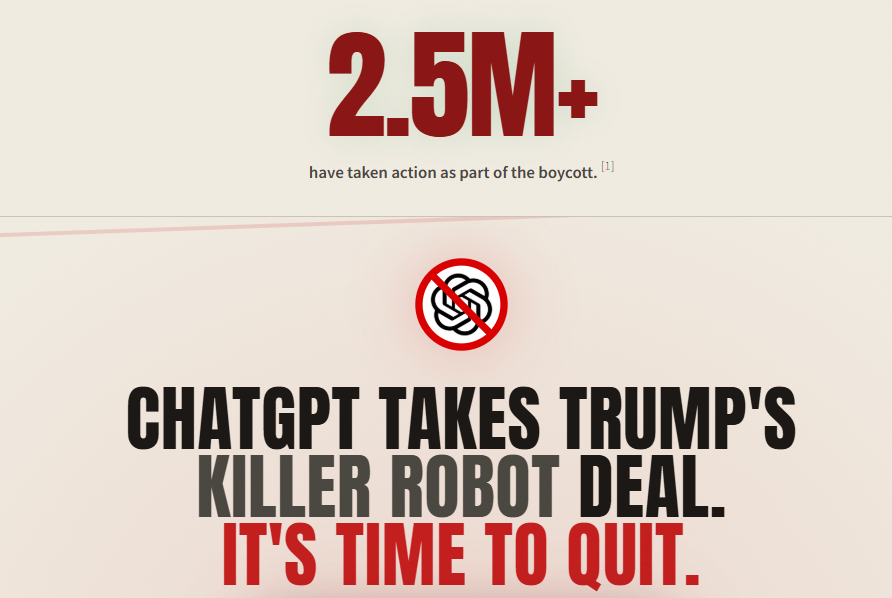
Several developments have fueled the discussion. OpenAI’s decision to allow its AI models to be deployed inside a classified network operated by the U.S. Department of Defense triggered backlash among some users. Reports indicate that uninstall rates for the ChatGPT mobile app surged significantly, with U.S. app uninstalls jumping 295% day-over-day on February 28, compared with the platform’s typical daily uninstall rate of around 9% over the previous month.
At the same time, a boycott website claims that more than 1.5 million users have pledged to leave ChatGPT (QuitGPT), citing concerns over government partnerships and corporate affiliations. In the same period, Claude reportedly climbed to the top of the App Store charts, overtaking ChatGPT as users searched for alternatives.
However, switching AI tools creates a practical problem.
Many people have spent months building context, prompts, and working memory inside ChatGPT conversations. Simply abandoning the platform can mean losing valuable knowledge, workflows, and preferences.
Check What Is QuitGPT Trend?
The good news is that switching tools does not mean starting from zero.
If you are planning to move away from ChatGPT and start using platforms like Knolli, you can transfer most of your AI context with a few simple steps. This guide explains how to move from ChatGPT to Knolli without losing your data, workflows, or accumulated knowledge.
Over the past few months, discussions around leaving ChatGPT have grown significantly across online communities. The shift is not happening because AI tools are losing relevance—quite the opposite. AI is becoming more deeply integrated into everyday workflows, which is precisely why users are reconsidering which platform they rely on.
Recent events accelerated this conversation. OpenAI’s agreement allowing the U.S. Department of Defense to deploy its AI models within a classified network sparked criticism among some users who prefer AI platforms that maintain stricter boundaries around government access. This decision triggered a visible reaction in user behavior.
But the biggest concern for most people considering the switch is not the platform itself.
It’s the data and context they’ve built over time.
Many users rely on ChatGPT for more than just chat. It has become a place to store prompts, document ideas, run research, draft content, and organize workflows. Leaving the platform without preparation could mean losing months—or even years—of accumulated knowledge.
That’s why the first step before moving to another AI platform is making sure you preserve your ChatGPT history.
Before switching tools, the most important step is exporting your data from ChatGPT. Fortunately, OpenAI provides a built-in option to download a complete archive of their conversations.
Inside your ChatGPT account settings, you can request an export of all your chat history. This archive contains every conversation you’ve had with the AI assistant, which can be useful later if you need to reference past prompts, research discussions, or project ideas.
However, this process is not immediate. After you request the export, OpenAI sends a download link to your email once the archive is ready. Because of this delay, it’s best to request your export before closing your account or deleting your chats.
Within the same settings menu, you’ll also find an option to permanently delete all conversations. If you plan to remove your account data from the platform, make sure you complete the export first. Deleting your chats before downloading the archive could prevent you from accessing important conversations later.
According to OpenAI’s support documentation, deleted chats are scheduled for permanent removal but may take up to 30 days to fully disappear from the system. The company also notes that certain information may not be deleted if it has already been anonymized or if the data must be retained for security or legal obligations.
For users planning to transition away from ChatGPT, exporting your conversation history ensures that the prompts, ideas, and workflows you’ve developed over time remain accessible, even after you switch to a different AI platform such as Knolli.
If you’ve spent months using ChatGPT for research, workflows, and content generation, you may already have a large amount of context stored inside your conversations. That context includes your writing style, project goals, preferred prompts, and the way you interact with AI tools.
Fortunately, you don’t need to rebuild all of that from scratch when moving to Knolli. With a simple process, you can extract your working context from ChatGPT and transfer it into Knolli so it becomes part of your AI copilot’s knowledge base.
The goal is to capture the memory ChatGPT has built about you and store it as structured knowledge inside your new AI environment.
Follow the steps below to safely move your context.
Start by opening ChatGPT and asking the system to summarize everything it remembers about you.
Use a prompt like this:
“Write out everything you remember about me, my goals, preferences, and how I like to work.”
ChatGPT will generate a summary of the information it has accumulated from your past conversations. This may include your work style, the types of tasks you ask for, preferred formats, and recurring workflows.
This summary becomes the foundation for transferring your AI context.
Once ChatGPT generates the summary, copy the entire response and paste it into a document file. This can be a simple text document or a document file that you keep as part of your AI knowledge library.
Saving the information in a document makes it easier to upload and reuse inside other AI tools later.
Next, log in to your Knolli workspace and upload the document to your copilot or AI agent’s knowledge base.
Knolli allows users to build custom AI copilots that are trained on specific documents, prompts, and workflows. By uploading your ChatGPT memory summary, you are essentially transferring the context that previously lived inside your ChatGPT conversations into your new AI environment.
After uploading the document, give Knolli a simple instruction:
“This is my memory from another AI assistant. Store this for future chats.”
This tells the system to treat the document as part of your persistent knowledge base.
Once the document is uploaded and the instruction is provided, Knolli analyzes the content and extracts the relevant information. The platform stores these insights as persistent memory that your AI copilot can reference in future conversations.
This means your new AI assistant can immediately understand your preferences, workflows, and working style—without requiring you to re-explain everything from the beginning.
Instead of starting fresh, your AI environment now continues with the context you already built.
One of the biggest concerns people have when leaving an AI platform is what happens to the information they created or shared there. If you have used ChatGPT for a long time, your conversations may include research notes, writing drafts, workflows, prompts, and other valuable context.
The good news is that switching AI tools does not automatically erase your past work.
When you export your ChatGPT data, OpenAI provides a downloadable archive containing your chat history. This archive acts as a backup of your conversations so you can reference them later or reuse the information in another system. Keeping this archive ensures that important prompts, ideas, and insights are not lost when you transition to a different AI platform.
However, it’s important to understand how data deletion works if you decide to close your account. According to OpenAI’s documentation, when chats are deleted, they are scheduled for permanent removal, but the process may take up to 30 days to fully complete. During that period, the data is queued for deletion but may still remain in internal systems until the process completes.
OpenAI also notes that some information may not be removed if it has already been anonymized or if the company must retain certain records for security or legal obligations. Because of this, exporting your chat history before deleting anything is the safest approach if you want to maintain access to your previous conversations.
Once your information is saved locally, you can begin transferring relevant knowledge into other AI tools. Platforms like Knolli allow users to upload documents, summaries, or prompt libraries into a knowledge base that their AI copilots can reference during future conversations.
This means that while your original conversations stay archived as a reference, the key insights—such as your goals, writing style, workflows, and preferences—can continue to live inside your new AI workspace.
In practice, switching platforms becomes less about abandoning your past data and more about moving the useful parts of that knowledge into a system that fits your future workflow.
The recent wave of users reconsidering ChatGPT highlights a broader shift in how people expect to use AI tools. What started as a conversational assistant has evolved into something many professionals rely on for research, writing, planning, and workflow management. As a result, leaving a platform is no longer just about choosing another chatbot—it’s about preserving the knowledge and working context built over time.
That’s why preparing before switching matters. Exporting your chat history, capturing the AI’s memory of your goals and preferences, and organizing your workflows help ensure that valuable information isn’t lost during the transition. Instead of abandoning months of conversations and prompts, you can convert them into structured knowledge that continues to support your work.
Moving to platforms like Knolli allows that knowledge to become part of a persistent workspace where AI tools can operate around your documents, workflows, and objectives. Rather than restarting from zero, your AI assistant can continue with the context you’ve already built.
Ultimately, the shift many users are making isn’t simply about leaving ChatGPT. It’s about moving toward AI systems that provide greater control over knowledge, memory, and workflows—while ensuring that the insights created along the way remain useful long after the switch.
Yes. ChatGPT allows users to request a full export of their chat history from the account settings. After you request the export, OpenAI sends an email with a download link to an archive of your conversations. This archive can be stored locally so you can reference past prompts, research, and ideas even after switching platforms.
No. According to OpenAI’s documentation, chats scheduled for deletion may take up to 30 days to be permanently removed from the system. Some information may also remain if it has already been anonymized or if OpenAI is required to retain certain records for legal or security reasons.
Yes. ChatGPT allows users to permanently delete their account through the account settings page. Once the deletion request is submitted, your account will be scheduled for removal. According to OpenAI, the deletion process may take up to 30 days to fully complete.
Before deleting your account, it is recommended to export your chat history. This ensures you keep a copy of your prompts, research notes, and conversations for later reference.
No, ChatGPT does not currently offer a temporary account deactivation option. If you stop using the service, your account simply remains inactive but still exists.
If you want to stop using the platform permanently, the only option available is to delete your account through the account settings. After deletion, the account and associated data will eventually be removed from OpenAI’s systems in accordance with their data retention policies.
